
How to scan a receipt into a budget entry
The receipt pile in your wallet does not have to be retyped one by one. The "Scan receipt" button on the Budget page photographs a receipt, reads it with AI, then fills the budget entry form for you to review — you still press Save.
Prerequisites
- The Budget page open on your event (you own it, or you are a co-planner — someone invited to help manage the event — with budget write access)
- Aira points — one scan costs 5, and "Cross-border AI processing" enabled in Settings
Open Scan receipt on the Budget page
Beside the "Add budget entry" button sits the "Scan receipt" button. Tap it and pick the photo — on a phone it opens the camera straight away (allow the camera when your phone asks the first time), on a computer the file picker. One photo per receipt; the best shot is upright, filling most of the frame, with no shadow across the numbers.
Approve the cost before it runs
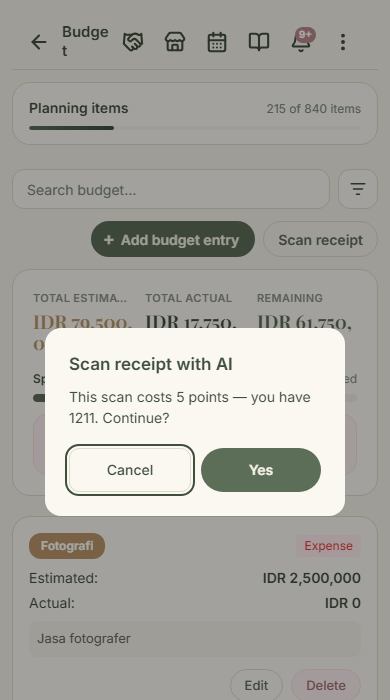
Once the photo is picked, an honest dialog names the price: "This scan costs 5 points — you have {available}. Continue?" Press "Yes" to go ahead or "Cancel" — cancelling here spends nothing, and the photo is only uploaded after you agree. If "Cross-border AI processing" is not enabled yet, what appears is not the cost dialog but a card: "Turn on AI processing to scan photos", with an "Open Settings" button.
Review the fields before saving
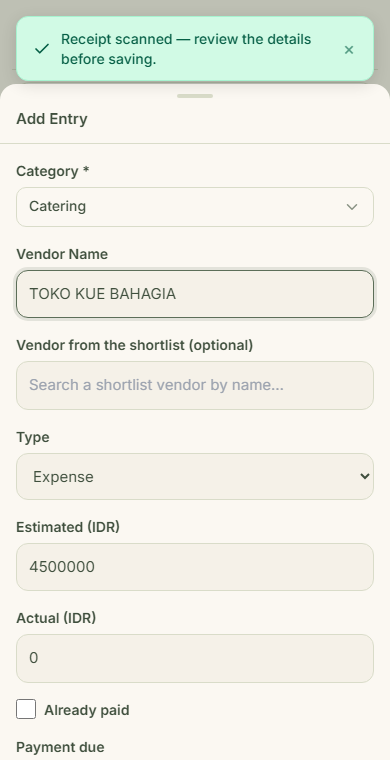
A few seconds later the "Add Entry" form opens pre-filled: the vendor name, a guessed category (catering, venue, and the like), a short note from the reading, and the receipt total dropped into the "Estimated" field. The toast even advises you: "Receipt scanned — review the details before saving." It did read from a photo, so a wrong digit is possible — one check, then press "Save" like any entry.
When it cannot read, or points run short
A blurry or cropped photo is refused with "Couldn't read this receipt — try a clearer photo" — and the points are refunded, because the read counts as failed. If the balance cannot cover 5 points, you get "Not enough AI points for this scan." and nothing is deducted; top up from the plans page first.
Common questions
How much does one scan cost?
5 AI points per photo, charged only when the read succeeds — a photo it cannot read is refunded. A new account's 25 free points equal five receipts.
Is the receipt photo stored?
No. The photo is processed for the read and deleted right after the scan — it does not become an attachment on the budget entry and is not kept in your account.
Can one photo cover several receipts?
No — one photo, one receipt, so the numbers do not mix. The next receipt goes through the same button.
Who can use the scanner?
The event owner, or a co-planner granted budget write access. Reading a photo also needs "Cross-border AI processing" enabled in Settings — the same consent as Aira chat.
Try Datella free — sign up in under a minute.
Start free