
How to claim your own subdomain
The default datella.app/event/something address works fine, but budi-ani.datella.app on a printed card reads differently. Your own subdomain is claimable from the editor — and one thing to know before starting: the choice is permanent. A claimed name cannot be changed.
Prerequisites
- An invitation created
- The subdomain add-on active on your account
Open the claim in invitation settings
On the editor rail, tap "More" → "Settings" and find the subdomain claim — separate from the invitation's default address. If the add-on isn't active on your account yet, this section points you to activating it from the plan screen; the price lives there, not on this page.
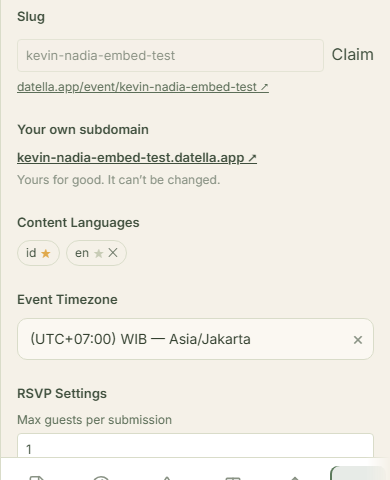
Check availability as you type
Type the name and the editor checks availability each time you pause. The rules: four to thirty characters, lowercase letters, digits, and hyphens — no leading or trailing hyphen, no double hyphens. Budi-ani, nikahan-jeje, keluarga-wibowo: all valid while unclaimed.
Choose carefully, because it's permanent
Once claimed, the subdomain locks for good — not a marketing line; there is genuinely no rename feature. So skip dates that age fast and jokes that last three days. Your two names or the family name is the choice that needs no explaining ten years on.
Claim and use it
Confirm the claim and the new address comes alive — guests open budi-ani.datella.app and land on the same invitation. The old datella.app/event/address keeps working too; two doors, one room. QR cards and per-guest links keep working unchanged.
Know its behavior when unpublished
Withdrawing the invitation from public does not release your subdomain — the claim stays yours. What pauses is the page: the subdomain serves the same "invitation not found" page as the regular address until you publish again. Permanent refers to the name; whether the content is live stays with the publish button.
Common questions
Can I change the subdomain after a typo?
No — there is no rename or self-release mechanism. A mistaken claim stays spent on your account. That is exactly why step three exists: check repeatedly before confirming.
What about a real domain like budi-ani.com?
Not yet — what's offered is a subdomain under datella.app. For most invitations that already reads cleanly on cards and in chats.
What happens if the add-on lapses?
The add-on is bought once and never expires, so its term cannot lapse. The one thing that releases your name is refunding its purchase — the name frees up for others to claim, while your invitation stays alive at the regular address.
Does a private invitation still work through the subdomain?
Yes — the subdomain is just the address; private rules still apply: guests still need their personal link to unlock.
Try Datella free — sign up in under a minute.
Start free