
Guest QR cards: print and share
A QR card bridges the digital invitation and the printed world: one card holding a guest's personal link and their door code. Guests keep it on their phones or carry the paper; staff scan the code on the day. Cards are made from the editor, one at a time — which is exactly why each card truly belongs to one person.
Prerequisites
- The invitation published
- The QR card visible at the invitation's end (default, nothing to add)
Open the QR card panel in the editor
The QR card section anchors the very end of the invitation and cannot be deleted — its panel provides the guest picker, preview, and downloads. You can also start from the guest's row on the RSVP list: the "Download invitation card" button produces their card directly.
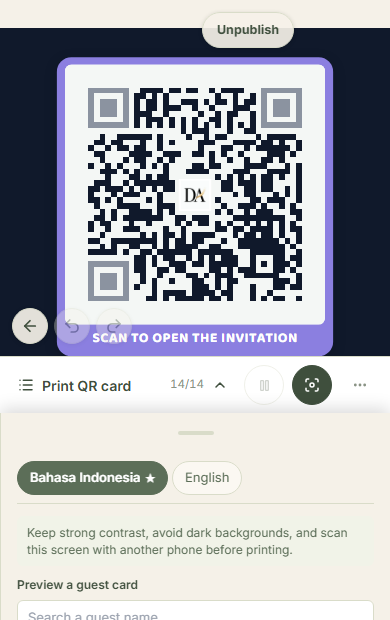
Pick the guest, see the card
The preview switches between the general card and any guest's card. A guest card carries the big QR of their personal link — the one that attaches RSVP answers to their row — plus the short code and a small door-specific QR. The general card holds only the public link, with no identity.
Heed the bearer warning
Before a personal card downloads, Datella reminds you: whoever holds this card can open and change that guest's RSVP. Printed cards do travel hand to hand — make sure they reach the right person, and for enthusiastic forwarders consider the general card instead.
Pick a size and download
Two print formats exist: 9×16 for phone-shaped cards and 2×3 (4R ratio, 10.5 × 15.7 cm). Both export as sharp 300-dpi PNGs, one file per card, ready for the print shop or a document. There is no download-everyone-at-once yet — cards come down one by one from the panel or the guest's row.
Use the code on the day
The small QR on a guest card is the door key: staff scan it at the check-in console and the guest is recorded — without that, the big QR merely opens the invitation and records nothing. The short code on the card can also be typed by hand when the QR has spent the day folded in a pocket.
Common questions
Can I download every card at once?
Not yet — each card downloads separately, from the editor or the guest row. For a hundreds-guest event, committees split the work: one person downloads per category while ticking names off.
Is the card's QR different from the one shared over WhatsApp?
It is the same guest's personal link — the chat version arrives as an image, the card version gets printed. Both lead to the same person's answer.
Can the card design be changed?
Within limits: caption, 9×16 or 2×3 format, QR colors, and a logo — all in the QR card panel. The base layout is engineered so scanners read the code, so the room to play is deliberately narrow.
A guest forgets the card on the day?
Not a problem: the small door-code QR can be scanned from the guest's phone screen (after they RSVP, the code shows on the invitation), or staff can type the short code or search the name directly. The card is the fastest path, not the only one.
Try Datella free — sign up in under a minute.
Start free