
How to moderate guest wishes
A wishes wall comes alive the moment the invitation spreads, and almost all of it is sweet. What you handle is the remainder: spam, misfires, or jokes funny only to their author. Datella screens profanity automatically, auto-hides wishes guests report, and gives you one screen for the remaining calls.
Prerequisites
- The invitation published
- The wishes section enabled in invitation settings
Enable the wall first
The wishes section ships off by default. Switch it on in the invitation settings and the wall appears as its own section: guests write a name and message — the message caps at two thousand characters — and a guest known from their personal link may submit exactly one wish.
Know the flow: what shows instantly
A clean wish posts immediately; one with flagged words waits in the pending list for your review. There is no "approve everything first" switch — screening is automatic, and your work is combing the held ones, plus rereading the passed ones if you like.
Open the moderation screen
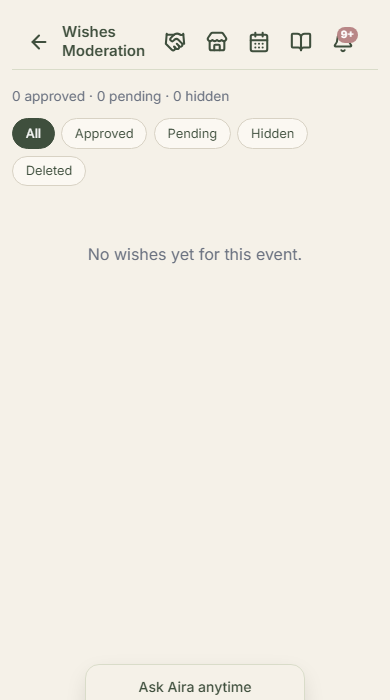
From the editor, the wishes link opens the moderation page: status tabs — all, approved, pending, hidden, deleted — each with counts. Every row can be approved, hidden, pinned to the top, deleted, or restored from the Deleted tab, with bulk actions for tidying many at once.
Handle guest reports
Guests can report an inappropriate wish right from the wall. Three reports from different people auto-hide it until you decide — the system stops there; the final call stays yours. Anonymous wishes, carrying no guest record, can arrive repeatedly; those are the ones most often worth hiding.
Keep a rhythm approaching the day
A wall pinned with close family's wishes sets the tone early: guests tend to follow the examples they see. Spend five minutes each evening on the pending tab — far lighter than combing hundreds on the morning of the event.
Common questions
Can I turn wishes off after the invitation spreads?
Yes — the setting flips off anytime and the wall vanishes from the invitation. Wishes already received stay stored, so switching it back on loses nothing.
Why doesn't my own wish as the couple show up?
If sent from a personal link whose record already submitted, the system refuses the duplicate — one person, one wish. Send from the public link as anonymous, or write from a committee account.
Is there a wish-count limit?
The guest wall pages through wishes without a count limit, and the moderation screen loads the latest five hundred at once — generous for any event scale in the region; routine sweeping keeps it comfortable.
A guest wrote someone else's name. Editable?
Wish contents can't be edited — the options are hide or leave. For harmless typos, most committees let them stand; the intent still reads.
Try Datella free — sign up in under a minute.
Start free