
How to add custom RSVP questions to your invitation
The standard form asks attending or not. The rest often matters just as much: meal choice, allergies, how many children, who needs the shuttle. In Datella those questions ride along on the RSVP form itself, answered in the same breath as the confirmation — no chasing guests over chat afterwards.
Prerequisites
- The invitation exists in the editor
Open the custom questions section
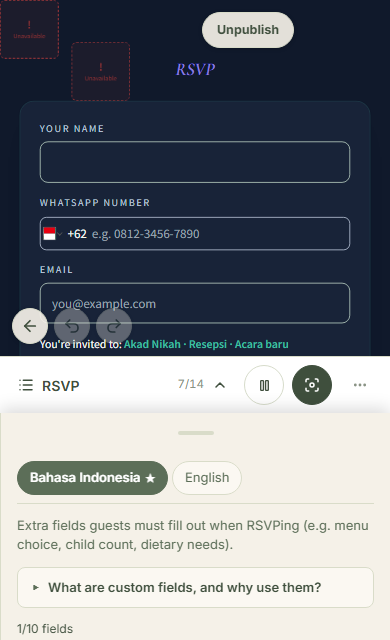
In the invitation editor, tap "Content" on the editor rail, then pick the RSVP section in the section strip. The panel that opens leads with "Extra fields guests must fill out when RSVPing (e.g. menu choice, child count, dietary needs)" — every custom question is managed there.
Pick the question type that fits
Six types exist: short text, long text, choice (dropdown), searchable choice, number, and date. Meal choice belongs in a dropdown — uniform answers are easy to tally; searchable choice suits a long option list. Allergies and special notes fit text. Children count fits a number, because numbers add up. Each person answers for themselves: a family of five fills five separate answers.
Write both language labels and the options
Every question requires an Indonesian and an English label — guests see whichever matches the invitation language they opened. For choice types, list the options one per line, in each language. You type the unique key yourself: short, lowercase, no spaces — menu_choice for instance — and it names the CSV column.
Mark required and set the order
Tick "Required" for questions that cannot be skipped — the form refuses to submit without them. Up and down arrows set the display order. Do not make everything required: two questions answered honestly beat six that guests rush through.
Read the answers in two places
Answers appear per person on each guest row, and the questions section carries a "View custom fields report" link. The report tallies choice answers with percentages, filters to "Checked-in only", and exports to CSV. The main RSVP report also gains one column per question when you print or export it.
Common questions
How many questions can I create?
Ten per event. The editor shows the count, and an eleventh is refused.
If I delete a question, do existing answers vanish?
No. Answers already collected stay readable in the report, tagged as coming from a deleted question; guests simply stop seeing the question on the form.
Can Aira create the questions for me?
Yes. Ask in the Aira chat — "add an RSVP question for menu choice with chicken, fish, and vegetarian options" — and she creates it in the same place your manual ones live, spending AI points like any Aira chat, fully editable afterwards.
Can a question target only some guests?
No — every guest opening the invitation gets the same form. Per-guest questions do not exist yet; filter the answers in the report or CSV instead.
Try Datella free — sign up in under a minute.
Start free