
How to embed the RSVP form on your own site
Your wedding site already lives on another platform, but you want the confirmation form to be the tidy, self-counting kind? Datella's embed add-on puts your invitation's RSVP form — custom questions and per-ceremony capacity included — onto any website, with answers landing in the same guest list as the invitation's.
Prerequisites
- The invitation published in open mode
- The embed add-on active on your account
Activate the embed add-on
The add-on is bought once per event and lasts a year. Purchase happens from the plan screen; once active, the embed panel appears at /invitation/<event>/embed showing the grant's status and expiry plainly.
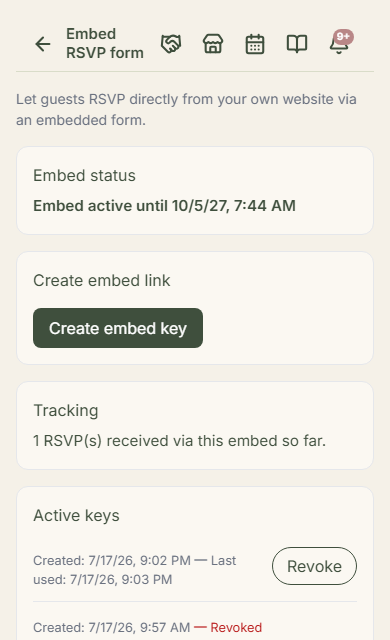
Mint a token — shown once, save it well
Tokens are minted from that panel in one click, and two things matter: the form refuses creation on a private-mode invitation — embeds are for open pages — and a new token deactivates the old one; only one token is active at a time. The raw token is displayed exactly once at creation, so copy it right then.
Paste the iframe snippet
The panel hands you a ready-to-copy snippet: one iframe carrying your form's address and token inside, to paste into your site's HTML editor, blog, or landing page. Its height is adjustable from the snippet; the rest follows the page width. The form's accent color can be tuned through an extra parameter.
Answers land in the same list
Guests filling the form from your website and guests answering from the invitation drop into one RSVP list — custom questions, ceremony choices, and per-family answers included. The embed panel shows a counter of how many answers arrived through the embed, so you know the site is pulling weight.
Revoke when needed, know the boundary
A token can be revoked from the panel anytime — revoked means the form stops working wherever it's pasted; that is its true role: a total kill switch, not a per-site fence. Unpublishing the invitation also halts the embed until republished, and once the add-on lapses, the form shows a polite closing notice instead of breaking.
Common questions
Does the embed work on WordPress/Wix/Squarespace?
Yes, wherever iframes are accepted — which is nearly everywhere. Paste the snippet into a custom HTML block; if your platform filters iframes, look for the page's "allow embed" setting.
The token is visible in the page source. Dangerous?
The token will indeed be visible in the code — that's normal. The risk isn't theft; a token only opens the fill-in form, nothing else. If things get rowdy, revoke and mint anew.
Can a private invitation be embedded?
No — the embed refuses private-mode invitations, because an open page means answers without personal keys. Consider switching to open mode first, or keep sharing personal links over WhatsApp.
Can two websites use the same embed?
Yes — the same snippet may be pasted on several pages, all using the one active token. What's limited to one is the active token count, not the page count.
Try Datella free — sign up in under a minute.
Start free