
How to send WhatsApp invitations one guest at a time
Sending one by one is slower, but guests read it as a real message instead of a blast. Datella prepares the message and a per-guest link; you add the personal touch before pressing send.
Prerequisites
- The invitation is published
- Guest phone numbers filled in (62… format)
- Write access to the guest list
Publish the invitation first
Send buttons only wake up once the invitation is live. While it is still a draft, the send button above the list stays disabled with a "publish your invitation first" message, and the per-guest sheet will not create a link yet. Publish from the invitation editor (that is its own tutorial), then come back to the RSVP list.
Tap the paper-plane icon on a guest row
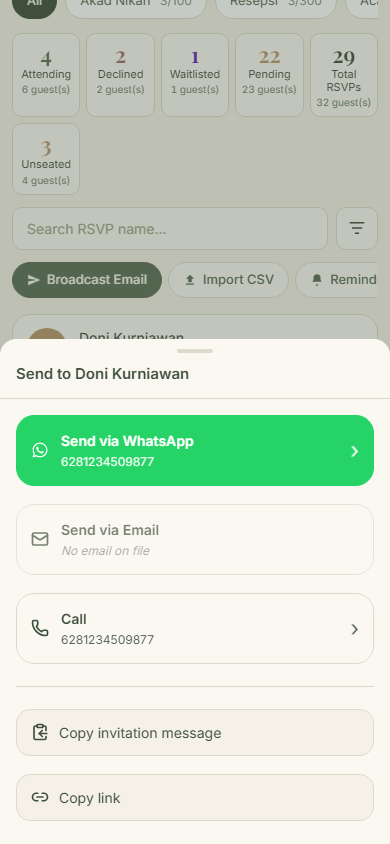
Every guest row carries a send icon in its corner. One tap opens a sheet titled "Send to <guest name>" holding a ready-made WhatsApp message: a greeting, the event name, and the link. This version is fine to send as-is.
Understand the personal link
The link inside the message ends in ?t=code, and it belongs to this guest alone, not the public one. RSVP answers submitted from it attach themselves to the right row automatically, and if you resend next week the link stays the same. Guests just open, read, and answer, with nothing to install.
Edit the message if you like
Tap edit to write your own version: a personal greeting or extra details. Bold, italic, and strikethrough buttons follow WhatsApp formatting. What goes out is your edited version, not the default text.
Send, then use the fallbacks
Tap send and WhatsApp opens with the message already typed; press send there, then return to Datella for the next guest. For a guest without a phone number the WhatsApp row goes dark; two ways around it: "Copy link" and send it through another channel, or "Send via Email". The "Call" button itself appears only for guests who have a number.
Common questions
Does sending WhatsApp invitations cost anything?
No. WhatsApp sends are unlimited and use no credits or points, because they go out through your own WhatsApp. Only mass email uses credits, and its composer shows the balance.
Can I change the default message text?
Yes, on every send: tap edit in the send sheet and write your version. There is no permanent template editor yet, so an edit applies only to the message you are composing.
What about guests without a WhatsApp number?
The WhatsApp row goes dark with a "no phone number on file" note. Two ways around it: copy the link and send it through another channel, or use "Send via Email", which carries this guest into the email composer with the recipient pre-checked.
Does Datella record which guests were sent to?
There is no "invitation sent" column. The single record is "Last reminded", and it fills only through the "Remind pending" queue, not from this send sheet. If a sending history matters to you, work through that queue (its own tutorial).
Try Datella free — sign up in under a minute.
Start free