
How to remind guests who have not confirmed
Reminding feels like chasing people, but guests usually forgot rather than refused. Datella builds the queue for you: who has not answered, who has gone unheard from longest, and when each was last reminded. You press one button per name.
Prerequisites
- The invitation is published
- At least one guest still "Pending"
Pick the right moment
Most couples remind in two waves: around D-14 for invitations still unanswered, and D-7 for the final push. Close family and dear friends deserve a phone call instead; note those five to ten names outside the app, and leave the WhatsApp queue for everyone else.
Open "Remind pending"
Above the guest list sits the "Remind pending" button, present whenever someone truly is pending. It opens an automatic queue: only guests still marked pending. Never-reminded guests sit at the top, followed by whoever has gone longest without a nudge, so nobody gets a second reminder before everyone has had a first.
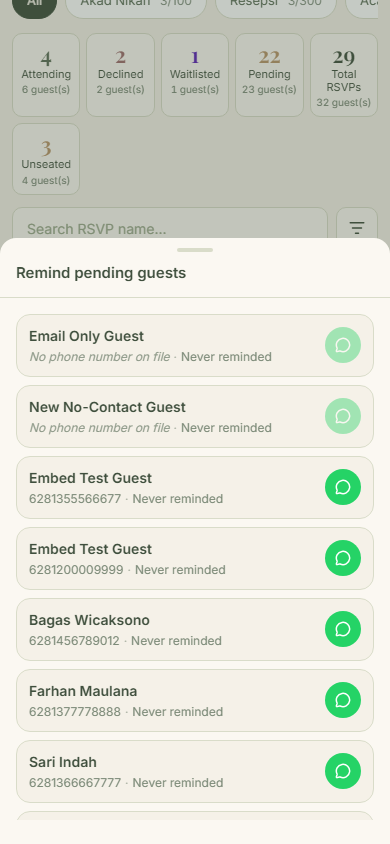
Send one by one from the queue
Each row has a WhatsApp button. Tap it, WhatsApp opens with a message holding that guest's personal link (the text is still the invitation text: greeting, event name, link), send it, then return to Datella for the next guest. There is no send-all button: identical mass reminders are easy to report as spam, while one by one reads as personal. To change the reminder wording, edit it through that guest's send sheet; the queue sends the default as-is.
Watch the 48-hour marker
Rows reminded within the last 48 hours glow amber, a gentle cue not to overdo it. Datella never blocks a resend; the call stays yours. The "last reminded" time is stored per guest and comes along in the CSV export.
Want someone outside the pending list? Pick manually
From the three-dot menu on the guest list, "Pilih tamu" (select guests) opens selection mode: tick anyone, including attending or waitlisted guests, then tap "Kirim WhatsApp". Same path as the queue, only you decide the recipients.
Common questions
Does reminding guests cost anything?
No. Reminders go out through your own WhatsApp, no credits and no points. Only mass email uses credits.
How many times may I remind the same guest?
The app sets no limit. The 48-hour amber marker is advice, not a rule; you know the relationship best. Two reminders a few days apart usually suffice before switching to a phone call.
Why is a certain guest missing from the queue?
The queue holds only pending guests. Anyone who answered, or whom you set to "Daftar tunggu" (waitlisted), is excluded. To reach them anyway, use the "Pilih tamu" selection mode.
Will guests know the reminder is automated?
Nothing reaches a guest automatically. The message goes out from your WhatsApp as an ordinary chat, and its text is the invitation text again, not a robot's.
Try Datella free — sign up in under a minute.
Start free