
How to add and organize guests in Datella
One row in the guest list is one household or party, not one person. Add them one by one or by import, give them categories, and watch RSVP statuses update on the same screen.
Prerequisites
- An event already created
- Write access to the guest list (owner, or a co-planner granted it)
Open the RSVPs tab
The bottom navigation has an RSVPs tab. Above the list sits an "n/25 RSVPs" counter: that is your free-plan allowance, counted per household, not per person.
Tap the green + button
A round green plus button sits at the bottom right. One tap opens the "Add RSVP" sheet. In the Android app there is also a "Pick from contacts" button that pulls name, phone and email straight from your phone. On the web version the button does not appear, so you type manually.
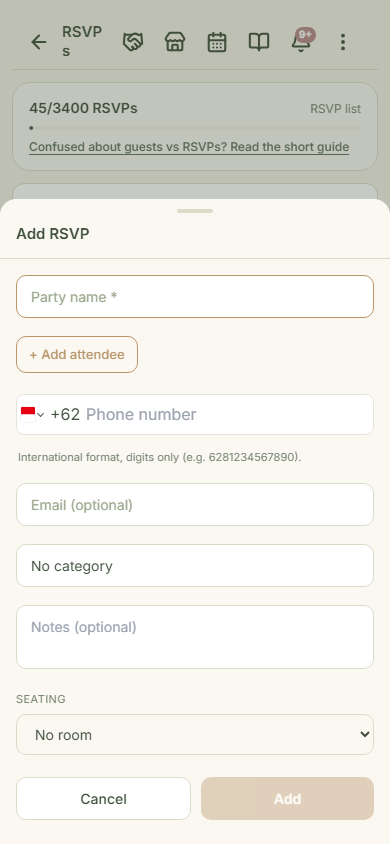
Fill the family name and its members
Only one field is required: "Party name", for example "Mr. Hendra's family". If more than one person is invited, tap "+ Add attendee" and list them; they are recorded as members of the same party. Phone numbers use international format without the plus sign (6281234567890); the tip below this step explains why.
Pick a category and save
The default categories are Keluarga, Teman and Kolega (Family, Friends, Colleagues; the app keeps the Indonesian labels); leaving it on "No category" is fine too. Tap "Add" and the party appears at the top of the list. If something similar already exists, Datella shows a "View existing guest" button instead of creating a duplicate.
Manage status and details per guest
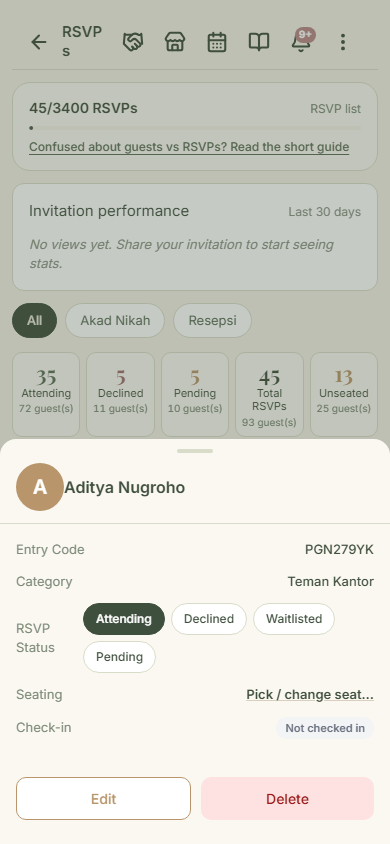
Tap any guest to open their detail sheet: entry code, category, four status buttons (Attending, Declined, Waitlisted, Pending), and seating. You can set the status yourself; say a guest replies by phone and you record "Attending" directly. Careful with the "Delete" button at the bottom: the "Delete this RSVP?" dialog has no undo. Answer yes and the guest is gone for good (see the warning below this step).
Common questions
How many guests fit on the free plan?
25 households. One household can hold several member names, so 25 rows usually covers 50 to 70 people. Paid plans raise it to 1,000.
How do I add guests without typing one by one?
Three ways: "Pick from contacts" in the Android app, a CSV import for lists already in Excel or Google Sheets, or a photo of a handwritten list read automatically (uses AI points).
What do "Pending" and "Waitlisted" mean?
Pending means the guest has not answered; every guest starts there. Waitlisted is set by you when capacity is full: the next guests queue up, and you decide who gets promoted.
Do my guests need the app?
No. Guests receive an invitation link over WhatsApp or email and answer from their browser.
Try Datella free — sign up in under a minute.
Start free