
How to create your first event in Datella
Five minutes from an empty account to a running event with a starter checklist. Datella drafts the plan; you correct whatever does not fit.
Prerequisites
- A Datella account (free)
- A rough date; it does not need to be final
Start from Home
After signing in, Home shows a "Plan my event" card. Tap it and a four-step wizard opens. To create another event later, tap the event-name pill (top left) → "New event".
Pick the event type and the basics
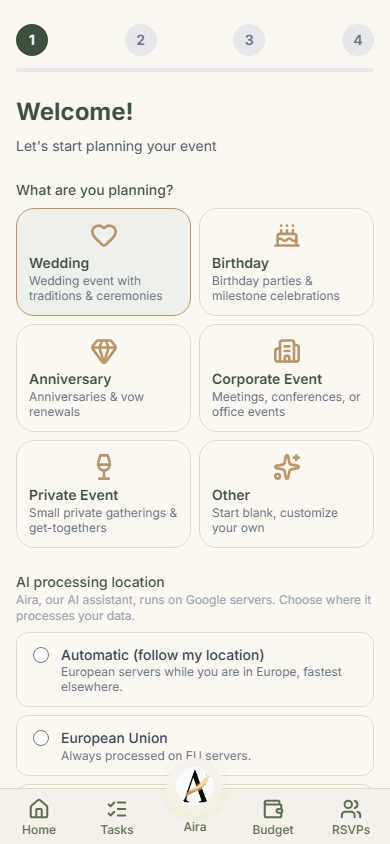
Six choices: Wedding, Birthday, Anniversary, Corporate Event, Private Event, or Other if you would rather start clean. Continue with an event name (3 characters minimum), a date (today or later), and the currency for your budget. The description is optional. The more you write, though, the closer the first draft lands. The screen also asks for the "AI processing location": where Aira (Datella's AI assistant, running on Google servers) may process your data. Three choices: automatic (follows your location), always in the European Union, or global. Pick one; without a pick, the Next button takes you nowhere.
Skim the coordinator note
Step two only explains how co-planners join through invite codes; there is nothing to fill in. Coordinators can be added any time later from Settings, so keep going.
Set budget and guest estimate
The budget is optional; tap "Skip for now" if you have not settled on a number. Type it plain (50000000, no separators). The guest estimate can be rough too: it defaults to 100 and the −/+ buttons move in tens. Both numbers size the checklist and budget to your event, and both are editable later.
Review the starter plan, then create
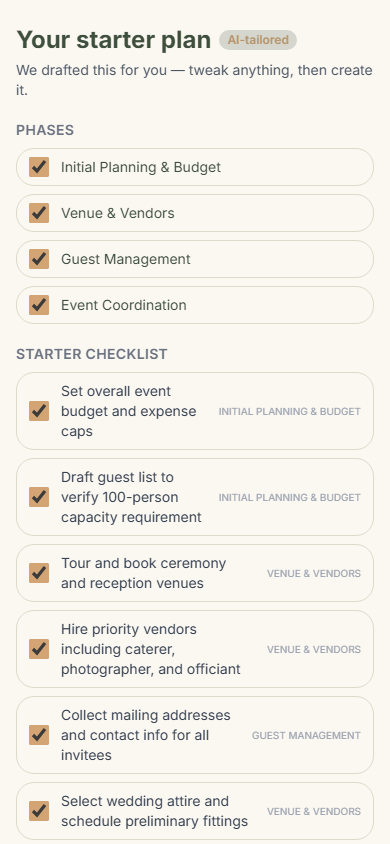
Datella assembles "Your starter plan": phases plus a checklist, everything checked. Uncheck what does not apply; unchecked items are not saved. Want more detail? "More detail" refines the draft once more for 5 AI points. When it looks right, tap "Create my plan". The event goes live and you land on Home with your first checklist waiting.
Common questions
Is Datella free?
You can start free: 25 RSVP households, 20 checklist items, and 25 AI points are included. Hitting a limit never deletes your data (it is kept for at least one year), and you can upgrade any time.
Does it work for events other than weddings?
Yes. Step one offers six event types and a free-text description. The generated checklist follows the type you pick.
Do I have to use the AI?
No. If AI points run out or you skip refining, Datella uses a starter template that still produces a working checklist. Every item can be re-checked before saving.
What cannot be changed once the event exists?
Nothing is locked. Name, date, guest estimate, even the currency can be changed from the event settings. One note about currency: amounts already recorded are not converted, so think twice before switching it.
Try Datella free — sign up in under a minute.
Start free