
How to create a Datella account
Five minutes, free, no credit card. Sign-up asks you to pick a role, but that choice only decides the first screen you see; the account itself works for everything.
Prerequisites
- An active email address for verification
- A password of at least 8 characters
Open the sign-up page
Go to datella.app and tap Daftar (sign up). In a browser, sign-up runs in two stages: pick a role, then fill in the email form. The steps below follow the browser path. On the Android app there is no form: pick a role, sign in with Google, and you are moving.
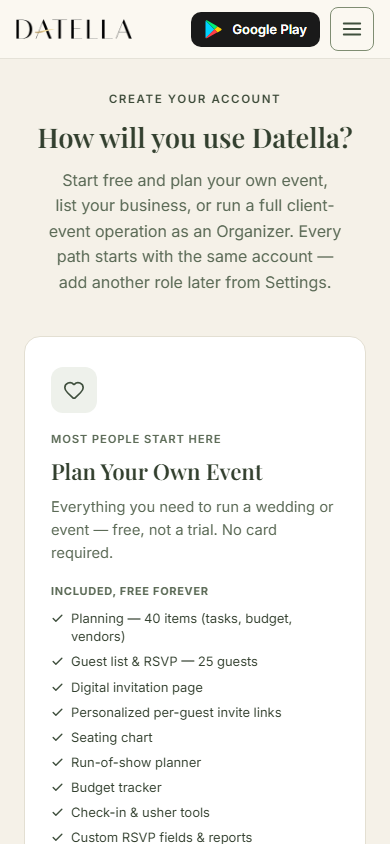
Pick your role
Three cards: Pengguna (user) to plan your own event, Vendor to list a business, and Organizer to run client events. Tap one, for example "Continue as User". The choice locks nothing. Later, the vendor role is added from Settings, and the organizer track opens through its own application page; one account can hold several roles at once.
Enter email and password
The form is short: a display name (optional, 80 characters max), email, a password of at least 8 characters, the password typed again, and a captcha checkbox. If the email is already registered, Datella points you to the log-in page instead; that means the account exists from before.
Verify your email
Once the form sends, the page swaps to a "Check your email" card. A verification link goes to your address; click it, then log in with the email and password you just made. A password account stays inactive until that link is clicked. Signing up with Google skips verification entirely: you are logged in immediately and taken straight into creating your first event.
Log in for the first time
On the log-in page, type your email and password or use "Sign in with Google". New users land on Home with a "Plan my event" card; start there for your first event. Vendor and organizer sign-ups are routed to their application form first.
Common questions
Does creating an account cost anything?
No. The account and its free plan need no credit card: 25 RSVP households (the guest list counts one family invitation per row), 20 planning items, and 25 AI points for a new account; the first plan draft, for example, uses 5 of them. Payment only appears when you choose to upgrade or top up.
Can I change roles later, say from user to vendor?
Yes. The role picked at sign-up only decides your first screen. The vendor role is added from Settings at any time; the organizer track opens from its own application page. One account can hold both.
Why can I not log in even though my password is right?
Most often the email is not verified yet. Try logging in again; a "verify your email to continue" notice appears with a resend button. After several failed attempts in a row, log-in locks for 15 minutes as the on-screen message says.
Can two accounts share one phone?
Yes, by taking turns. There is no account switcher, so log out from Settings (the "Log Out" row) first, then sign in with the second account. Logging out clears the previous account's data from the device.
Try Datella free — sign up in under a minute.
Start free