
How to add background music
Music turns an invitation from a card into an atmosphere. In Datella the track comes from two sources: a curated instrumental library, or your own file. And the question everyone asks — "why doesn't the music start by itself?" — is answered in step three, and it isn't a bug.
Prerequisites
- The invitation editor open
Open the music panel in settings
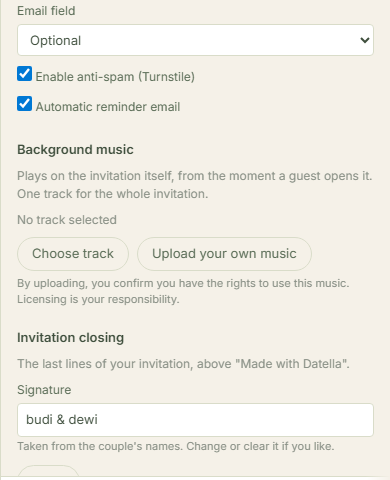
Music is set per invitation, not per section: tap "More" → "Settings" on the editor rail and find the music panel. That's where you pick a track, upload one, or switch music off entirely.
Choose from the library, or upload your own
The picker pairs the curated library — akad instrumentals, soft piano, acoustic, cinematic strings, plus a collection the Datella team maintains — with your own file. Uploads accept the common formats MP3, M4A, AAC, OGG, WAV and siblings up to ten megabytes, stored as-is without compression. If both are set, your upload wins.
Understand the start: one tap
Phone browsers forbid sound starting on its own — every platform's rule, not Datella's choice. So your music begins exactly when the guest taps the splash page — the button reading "Open Invitation": that tap opens the invitation and starts the track, swelling over a second and a half, then looping. Guests can mute it anytime with the small floating button.
One track for everyone
The track serves the whole invitation — Indonesian and English guests hear the same song, and there is no per-section music. If your ceremony and reception call for different moods, pick one that carries both; instrumentals travel well.
Mind the licensing
Uploading commercial music is the uploader's responsibility — Datella shows this warning on the panel too. Safe picks: the curated library, license-free music, or direct permission from the rights holder. A famous pop song isn't a technical problem; it's a permission one.
Common questions
Why doesn't the music play before I tap anything?
Because browsers block autoplaying audio — for every digital invitation, everywhere. The splash tap is the starting moment; that's as fast as the technology allows.
The music stops when I open another app?
Yes — once the invitation tab loses focus, the browser may pause it. Standard phone behavior, not an invitation bug; returning guests resume or restart with the button.
Can several songs rotate?
Not yet — one track for the whole invitation. A trick some couples use: stitch two songs into one file in an audio editor, then upload the result.
Can I use a streaming link?
No — uploads take music files, not Spotify or Apple Music links. Download the file from a licensed source first, then upload it.
Try Datella free — sign up in under a minute.
Start free