
Multiple events, one Datella account
One Datella account can hold many events at once — a wedding, mom's birthday, the company gathering — and they all swap through one switcher on the home page. Some caps are per event; others are one pool across all of them. This page maps both, plus how to connect your wedding organizer.
Prerequisites
- A Datella account with at least one event
- For a second event: a free event slot (the free plan includes 1; paid plans 2, 3, or 5) — no new account needed
Switch events from the switcher
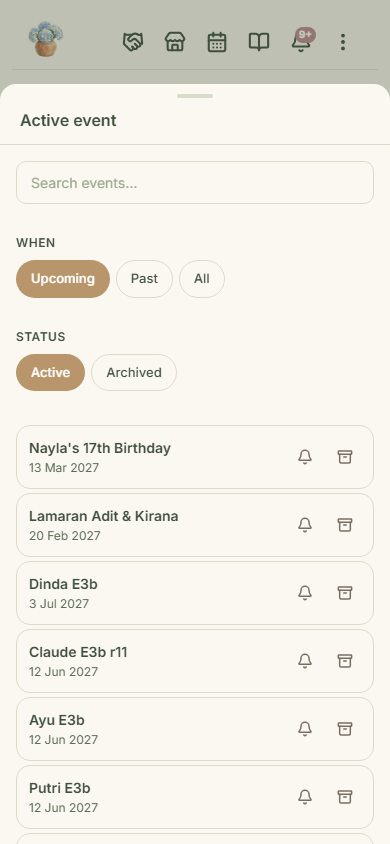
At the top of Home, your event's name sits on a button with a chevron — tap it to open the event switcher. Inside are a search field, "Upcoming", "Past", and "All" chips, "Active" and "Archived" chips, then your event list: a check mark flags the active one, and every row for an event you own carries a bell (mute) and an archive button. Picking a row switches the whole app to that event — home, guests, budget, invitation — and your choice sticks until you switch again.
Create a second event — any kind
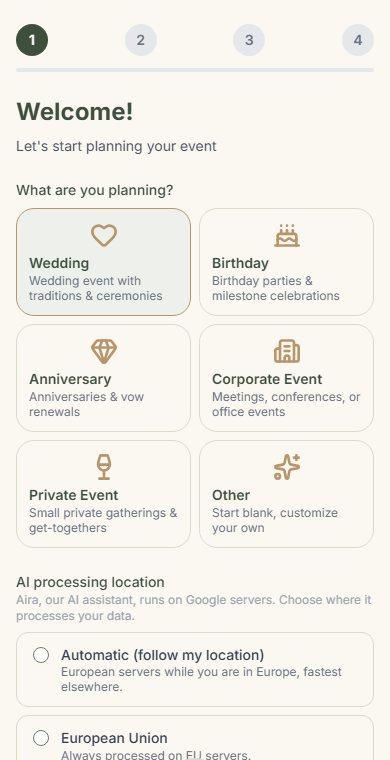
The "New event" button at the bottom of the switcher opens the same wizard as your first event, starting with "What are you planning?" and its choices: Wedding, Birthday, Anniversary, Corporate Event, Private Event, and Other. The event type is not just a label: the tradition step only appears for weddings, the starter checklist template follows the type, and Aira's starter plan is written around your choice. How many events you can own follows your plan: free 1, First Light 2, Golden Hour 3, Starlit 5, and the +5 Events add-on can be bought any time. When your slots are full, this button takes you to the Plans page instead.
Archive what's finished
Every event you own has an archive button in the switcher: "Archive event" hides it from the main view without deleting anything, and the "Archived" chip always brings the list back — "Unarchive event" restores one as it was. Handy for events that passed but still get opened now and then: the old invitation, vendor contacts, budget notes.
Understand which caps cross events
Two kinds of caps behave differently. Tied to the event itself: the budget contents, the invitation, and its photo gallery. Counted across events: your guest/RSVP allowance and planning items — guests, checklist tasks, budget entries, and vendor shortlist rows from ALL your events are tallied together in one per-account pool. The budget data itself stays with its own event; only the count is shared. So creating a second event does not grant a fresh allowance — what's left in the pool is what you share. Plan capacities and how to add them live on the pricing page.
Have an event organizer? Connect them here
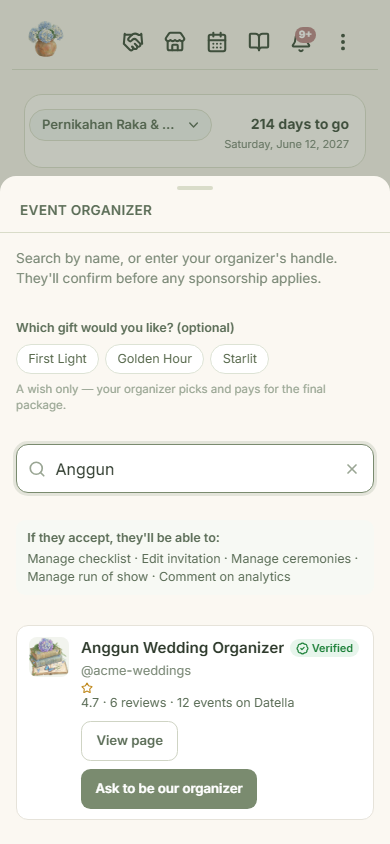
The ⋮ menu on Home has a dedicated row: "I have an event organizer". It opens a search sheet: type your organizer's name or @handle — every result is a card: a "Verified" badge, the rating and review count, the events they've run on Datella, their city, and a "View page" link to their public page. The request goes through its own "Ask to be our organizer" button (Enter only searches), and the sheet shows what the organizer will be able to do on your event before you ask. then reads "Waiting for {org} to confirm your sponsorship request" (you can cancel it any time), and the moment the organizer approves, your account's capacity pool rises for a year — the chip reads "A year of capacity, courtesy of {org}" on that event. The reverse flow exists too: when an organizer reaches out to you first, you are the one who taps "Accept" or "Decline" on that banner. The organizer joins as a member with narrow permissions — no guest or budget access until you open it yourself through the permission matrix.
Common questions
Is there a limit on events per account?
Yes: the free plan includes 1 event, First Light 2, Golden Hour 3, and Starlit 5 — and the +5 Events add-on (valid 1 year) can be bought any time. Archived events still count. The contents are capped by your plan too: planning items, guest counts, and co-planners.
Is the planning-item allowance per event?
No — and the guest/RSVP allowance works the same way: checklist tasks, budget entries, vendor shortlist rows, and guests from ALL your events count together in one per-account pool. A second event does not bring a fresh allowance unless capacity is added.
Can I delete an event I no longer use?
There is no button for that — archiving is the answer. An archived event leaves the main list but reopens and unarchives any time, with nothing lost.
What does a wedding organizer's sponsorship give?
A year of extra capacity in your account pool, through the event the organizer sponsors — planning items, guest cap, file storage, and a subdomain. AI points are not included; those stay with your own account.
Try Datella free — sign up in under a minute.
Start free